Tampilkan postingan dengan label iPhone. Tampilkan semua postingan

24 Mei 2011

Instal iAcces Keyboard : Custom Keyboard Untuk iPhone

Posted On Selasa, Mei 24, 2011 by iJonk Weelix 0 komentar

How to install iAcces keyboard on iPhone.

Seperti pada judul artikel ini, iAcces adalah custom keyboard untuk iphone yang tersedia di cydia. Dengan menggunakan iAcces Anda dapat membuat atau menggunakan custom tema keyboard yang tersedia di cydia ataupun tema yang ingin Anda buat sendiri. Tidak hanya untuk IOS 4.X saja, tapi iAcces juga tersedia untuk IOS 3.X, dan bisa digunakan untuk iphone, ipod touch, dan ipad. iAcces tersedia di cydia dengan free trial 20 hari.

Pada post ini akan Saya jelaskan bagaimana cara insatal iAcces di iphone dan ipod touch pada IOS 4.x.
Untuk mengikuti langkah ini pastikan iphone atau ipod touch Anda sudah di jailbreak. Ikuti petunjuk Jailbreak iphone, ippod touch, ipad disini untuk jailbreak iphone, ipod touch Anda.


Cara instal iAcces di iphone, ipod touch IOS 4.X Cracked.

  • Buka cidia di iphone Anda.
  • Cari "iAcces 4 China" untuk IOS 4.x ( pastikan iAcces dari insanelyi repo ), jika Anda tidak memiliki repo tersebut baca disini.
  • Setelah Anda menemukanya, silahkan instal dan restart springboard iphone Anda.
  • Setelah restart springboard iphone, pastikan Anda reboot iphone Anda secara manual (Slide to power off).


Sekarang saatnya untuk konfigurasi iAccces di iphone Anda.
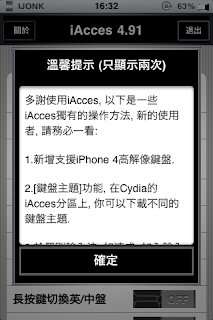
  • Buka aplikasi iAcces di iphone Anda, dan akan muncul seperti pada gambar di bawah ini dengan bahasa yang tidak bisa saya mengerti. Langsung pilih 確定 (KAKUTEI).


  • Kemudian pada bagian "app language" pilih "English". Lalu akan muncul peringatan bahwa iAcces akan diubah dalam bahasa inggris, pilih "OK".


  • Tutup aplikasi iAcces dengan menekan tombol "Home" kemudian buka lagi iAcces. Sekarang iAcces Anda sudah dalam bahasa inggris.


Sekarang geser springboard Anda ke arah "Search", dan lihat tampilan keyboard Anda sekarang ! Sekarang Anda bisa melihat tampilan keyboar yang berbeda di iphone Anda.

Bagaimana? Cantik, menarik dan menggoda bukan?


Note :
Anda juga bisa menggunakan tema keyboard seperti diatas yang bisa Anda download dari cydia. Jangan lupa  komentar Anda di kolom bawah :D.


23 Mei 2011

OS Faker, Ubah iPhone Kamu Menjadi Android Phone Dan Windows Phone 7

Posted On Senin, Mei 23, 2011 by iJonk Weelix 0 komentar

Seperti yang Kami alami, Kami juga tahu bahwa Anda mencintai iPhone begitu banyak, dan tidak akan pernah berpikir memiliki telepon yang berbeda. Tapi, apakah Anda pernah menemukan diri Anda berpikir di bagian belakang pikiran nakal Anda,  "Apa rasanya memiliki ponsel Android? Apa yang akan terjadi apabila memiliki telepon seperti windows phone 7?". Anda mungin ingin mencoba satu hal ini pada iPhone tercinta Anda?, Langsung saja Periksa Loader! Applikasi yang memungkinkan Anda mensimulasikan iPhone menjadi Windows 7 dan telepon Android.


Aplikasi yang hebat ini dapat ditemukan di Cydia dengan gratis! Cukup mencari OSFaker, dan Rasakan kecurangan menyenangkan di iPhone Anda untuk diperlihatkan pada teman teman Anda.


Tetap bersama kami untuk mendapatkan update dan berita terbaru dari kami.

Temukan MASI JONK BLOG di Facebook . Dapatkan informasi terbaru kami langsung di Facebook Anda.


Jailbreak White iPhone 4 ( iPhone 4 Putih )

Posted On Senin, Mei 23, 2011 by iJonk Weelix 0 komentar

Setelah memberitahukan tentang kehadiran White iPhone 4 ( iPhone 4 Putih ) beberapa waktu lalu, kali ini kami memperoleh berita bahwa White iPhone 4 juga menjalankan OS yang sama seperti pada Black iPhone 4.


Dari data yang kita ketahui pada screenshot diatas, White iPhone 4 masih menjalankan iOS 4.3.1. Ini berarti jika Anda membeli White iPhone 4 saat ini Anda masih bisa Jailbreak iPhone 4 tersebut menggunakan Jailbreak Tools yang ada saat ini. Anda bisa jailbreak White iPhone 4 menggunakan Redsn0w, Sn0wBreeze, dan juga PwanageTool.


24 Maret 2011

Celeste Bluetooth File Sharing Now Available In Cydia

Posted On Kamis, Maret 24, 2011 by iJonk Weelix 0 komentar

Finally the long awaited app is now live, Celeste is a new Cydia tweak which brings back the missing feature to your iPhone, iPod and iPad. Celeste allows you to send and receive songs, photos, contacts and more with device which support Bluetooth.


Celeste is the Bluetooth file transfer Apple forgot. Long awaited, Celeste allows your iPhone, iPad, or iPod Touch running 4.2 or higher to send and receive files from any brand of mobile phone from BlackBerry to Nokia and any computer (Mac or PC) that supports OBEX Bluetooth file transfers.

With zero configuration, Celeste integrates with a wide variety of apps - including Photos, iPod, Contacts, iBooks, Voice Memos, iFile, and Dropbox. Send and receive all your favorite and important files instantly after purchasing and installing Celeste!

Every purchase of Celeste gets you a free copy of Gremlin (a $1.99 value). Gremlin allows you to import received songs and videos into your ipod library, with full itunes-sync capability.


More over Celeste integrates perfectly with your built-in iOS applications. Just like magic. See it in action in the below video.


Celeste is available in Cydia via ModMyi repo for $9.99 (3 Days Launch Sale - $7.99 ), giet it now !


21 Maret 2011

Unlock Solution iPhone 4 Baseband 2.10.04 / 3.10.01 With Gevey SIM

Posted On Senin, Maret 21, 2011 by iJonk Weelix 0 komentar

Yes you read it right, here's a new team called Gevey team has announced a new unlock hardware tool which able to unlock iPHone 4 running iOS 4.1 and 4.2.1 basebands 2.10.04 and 3.10.01.


You will need to use the SIM tray supplied and file your MicroSIM slightly to accommodate the EEPROM chip.


Installing the SIM, only with something in between.


The phone will search for signal, comes up with no service and finally settling on this "one bar" icon. Earlier hacks required the fake IMSI to be programmed manually however this device is obviously capable of rapidly cycling a list of IMSI until an accepted MCC/MNC combination is found.It may also spoof ICCID since the iOS is known to cross-reference.


Dial 112 and hang up after the call is connected. The network issues a TMSI for your connection.


Toggle flight mode On/Off. What exactly happens is not too clear but apparently the interposer ROM block electrical connection to prevent the BB from detecting the fake IMSI.


The signal bars appear, we are safe:-) That is after the network ignored the fake IMSI (which the phone has no knowledge of) but allowed the SIM onboard because it is able to validate that.


Buy it or not? Till now, no one of the iPhone dev-team confirm its legitimacy, but we'll know this very soon, then you'll be able to buy it.